Payment Operations Management: A Practical Guide for Growing Businesses
When a company processes fifty transactions a month, tracking incoming and outgoing money rarely feels like a discipline of its own. A founder or office manager checks the bank feed, matches a few invoices in a spreadsheet, and moves on.
That approach quietly breaks down once transaction volume climbs into the hundreds or thousands. Suddenly, failed recurring charges sit unnoticed for days, customer support fields questions about duplicate authorizations, and the finance team spends the first week of every month untangling payout batches that do not match the general ledger.
This operational gap is exactly what payment operations management solves. Rather than focusing solely on choosing a payment gateway or negotiating processing rates, payment operations covers the entire lifecycle of moving, tracking, reconciling, and protecting money across a business.
Where Payment Operations Differs From Payment Processing
Businesses often treat payment processing and payment operations as interchangeable, yet they address two separate layers of financial infrastructure.
Payment processing is the technical mechanism that authorizes, clears, and settles an individual transaction between a customer’s bank and a merchant’s account. It relies on payment gateways, card networks, and acquiring banks.
Payment operations (PayOps) is the internal system of workflows, tools, controls, and people that manages everything surrounding those transactions. It ensures that every dollar entering or leaving the company is routed properly, recorded accurately, and matched against underlying business records.
| Dimension | Payment Processing | Payment Operations Management |
|---|---|---|
| Core Focus | Moving funds from payer to payee | Managing the end-to-end lifecycle of money movement |
| Primary Tools | Gateways, merchant accounts, card networks | Billing platforms, ERP systems, reconciliation software, bank APIs |
| Key Metrics | Authorization rate, transaction speed, processing fees | Reconciliation accuracy, involuntary churn, days sales outstanding (DSO), exception rate |
| Main Risk | Declined transactions or gateway downtime | Unreconciled cash, revenue leakage, delayed vendor payouts, compliance gaps |
Core Pillars of a Functional Payment Operations Setup
As transaction volume grows across multiple regions, currencies, or payment methods, a structured payment operations framework generally rests on five connected functions.
1. Payment Routing and Orchestration
Relying on a single payment processor creates a single point of failure. If that provider experiences an outage or declines legitimate cross-border cards at a high rate, revenue stops immediately. Modern payment operations teams use routing rules to direct transactions to the processor most likely to approve them at the lowest cost—for example, sending domestic ACH transfers through a low-fee bank rail while routing international cards to a regional acquirer.
2. Billing, Invoicing, and Collections
Payment operations bridges the gap between sales terms and actual cash collection. In B2B environments, this means generating accurate invoices with clear payment links, tracking net payment terms (such as Net 30 or Net 60), and automating follow-up reminders before an invoice becomes overdue. In subscription or high-volume consumer models, it involves managing recurring billing schedules, prorated upgrades, and tax calculations.
3. Automated Reconciliation
Reconciliation is the process of matching internal records (invoices, orders, and ledger entries) against external records (bank statements and processor settlement reports). Because payment processors often group hundreds of customer payments into a single daily bank deposit—after deducting processing fees and refunds—manual matching in spreadsheets quickly becomes error-prone. Automated reconciliation ingests settlement files and bank feeds to match transactions line by line, flagging only genuine discrepancies for human review.
4. Exception Handling and Dispute Management
No payment system runs at 100% perfection. Cards expire, bank accounts lack sufficient funds, customers initiate chargebacks, and duplicate payouts occasionally occur. Payment operations defines clear procedures for handling these exceptions:
- Smart retries: Automatically re-attempting soft declines (such as temporary network errors or insufficient funds) at optimal times rather than canceling an order immediately.
- Dunning workflows: Sending timely, clear notifications to customers when a card fails so they can update their payment details without friction.
- Chargeback workflows: Gathering transaction logs, delivery confirmations, and customer communication records promptly to respond within card network deadlines.
5. Outbound Payouts and Vendor Disbursements
Payment operations is not limited to incoming revenue. Businesses that pay contractors, marketplace sellers, suppliers, or refund recipients need structured payout workflows. This includes verifying recipient bank details, scheduling batch disbursements, applying approval thresholds for large transfers, and tracking failed payouts so recipients are not left waiting without explanation.
Operational Warning Signs That Your Current Setup Is Straining
Many companies wait until an audit delay or a major cash-flow discrepancy forces them to overhaul their payment workflows. In practice, operational strain usually shows up earlier through specific day-to-day symptoms:
- Month-end close keeps stretching: Your accounting team needs five or more extra days each month just to explain differences between gateway reports and bank deposits.
- High involuntary churn: Customers are leaving not because they canceled their service, but because expired cards or routine bank declines went unrecovered.
- Fragmented payment data: Customer support cannot see whether a refund has settled without asking finance, and finance cannot see why a credit was issued without checking a separate CRM.
- Manual workarounds for edge cases: Partial refunds, split payments, or multi-currency invoices require manual spreadsheet adjustments outside your core billing system.
- Rising payment fraud or dispute ratios: Chargebacks creep upward because dispute evidence is assembled manually at the last minute or missed altogether.
Building a Scalable Payment Operations Workflow: Practical Steps
Improving payment operations does not require replacing your entire financial stack at once. Growing businesses typically see the best results by addressing bottlenecks in a logical sequence.
Step 1: Map Your Current Money Flows
Document every way money enters and leaves your business. List each payment method (cards, ACH, wire transfers, digital wallets), every processor or bank involved, and where transaction data is recorded. Highlight every step where a team member manually exports a CSV file or re-types numbers between systems. Those manual handoffs are your highest-priority automation targets.
Step 2: Standardize Transaction Identifiers
One of the primary causes of reconciliation headaches is missing metadata. Ensure every payment request carries a consistent unique identifier—such as an invoice ID, order number, or customer reference—that travels from your checkout or billing tool through the payment processor and appears on settlement reports. When systems share a common reference key, matching transactions becomes straightforward.
Step 3: Separate Routine Processing From Exceptions
Design your workflows so standard transactions flow automatically from authorization to ledger entry without human intervention. Reserve your team’s time for exceptions: unmatched deposits, high-value refunds, disputed charges, and failed payouts. Defining clear ownership for each exception type prevents issues from falling between finance, operations, and customer support.
Step 4: Implement Role-Based Controls and Security Standards
As more staff members interact with payment tools, unrestricted access creates both fraud and operational risks. Apply role-based permissions so support agents can initiate small, policy-approved refunds while large disbursements require dual approval. At the same time, maintain strict compliance with data security standards such as PCI DSS (Payment Card Industry Data Security Standard) by ensuring raw cardholder data is tokenized and never stored on internal servers.
Step 5: Track Operational KPIs Alongside Financial Metrics
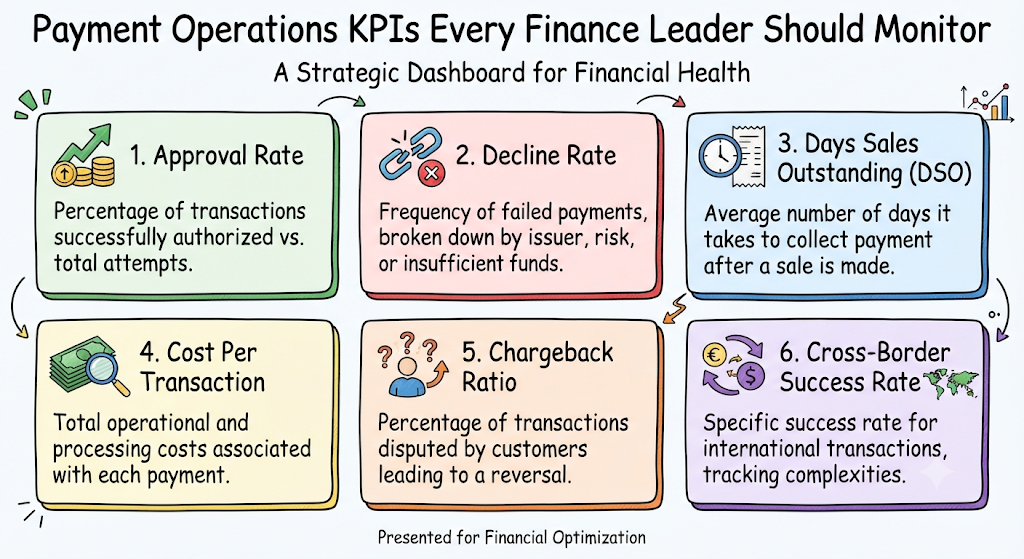
Revenue and profit tell you how the business performed, but payment operations metrics tell you how efficiently cash is actually moving. Monitor a focused set of operational indicators on a monthly or weekly basis:
- Authorization rate: The percentage of submitted payment attempts approved by issuing banks.
- Failed payment recovery rate: The share of initially declined payments successfully collected through retries or customer reminders.
- Unreconciled transaction backlog: The count and dollar value of transactions awaiting ledger matching.
- Dispute win rate: The percentage of contested chargebacks resolved in your favor.
Common Misconceptions About Payment Operations
1. “Payment operations is only necessary for enterprise companies or marketplaces.”
While large marketplaces face complex split-payment rules, even a mid-sized B2B software firm or e-commerce brand with a few thousand monthly transactions loses meaningful time and revenue to manual reconciliation and unrecovered card declines.
2. “Buying a single all-in-one payment gateway eliminates payment operations work.”
A payment processor moves money, but it does not automatically manage your internal approval rules, sync custom invoice terms with your accounting ledger, or coordinate customer outreach when a bank transfer fails.
3. “Reducing processing fees is the biggest financial win in payments.”
Shaving 0.10% off card processing fees matters at scale, yet recovering 15% to 25% of failed recurring payments—or cutting forty hours of manual month-end reconciliation—often delivers a larger immediate impact on net cash flow.
Frequently Asked Questions
Who owns payment operations inside a growing company?
In smaller businesses, payment operations is usually shared between a finance manager, an operations lead, and engineering. As transaction volume scales, companies often appoint a dedicated Payment Operations Manager who sits between finance, product, and engineering to oversee payment performance, reconciliation workflows, and provider relationships.
How does payment operations affect customer experience?
Every friction point in billing or payouts touches the customer directly. Clear invoices, localized payment methods, accurate tax calculation, fast refunds, and polite payment-update reminders reduce billing confusion and build trust with buyers.
What is the difference between payment operations and revenue operations (RevOps)?
Revenue operations focuses on aligning sales, marketing, and customer success to drive predictable revenue growth. Payment operations focuses on the financial execution layer—ensuring that billed revenue is actually collected, settled, accounted for, and compliant with banking rules.
When should a business consider multi-processor routing?
Adding a secondary payment processor makes sense when a single provider’s outage would halt critical operations, when expanding into international markets where local acquiring improves approval rates, or when transaction volume is large enough to negotiate competitive routing across different payment rails.
Bringing Discipline to Everyday Money Movement
Strong payment operations rarely makes headlines inside a company because its main achievement is reliability: invoices go out accurately, legitimate payments clear on the first attempt, failed charges recover smoothly, and the books close without last-minute detective work. By mapping your current money flows, standardizing transaction data, and automating routine reconciliation early, you build a financial foundation that supports growth rather than slowing it down.
Try it on your own invoices
Create GST invoices, share secure links and PDFs, and collect via Paytm payment links, UPI or bank transfer with PayManagerPro.